
Break and final whistle
Start half-time
Section titled “Start half-time”- At the half-time whistle, select Break → below the clock in Live.
- Scorilo asks “End this period?”. If goals still have open details, the question says how many; this does not stop you. Confirm.
Result: The clock stops, the period has ended and Scorilo switches to the Break view. If the display is connected and the break program is not empty, the break program starts on its own from the first item.
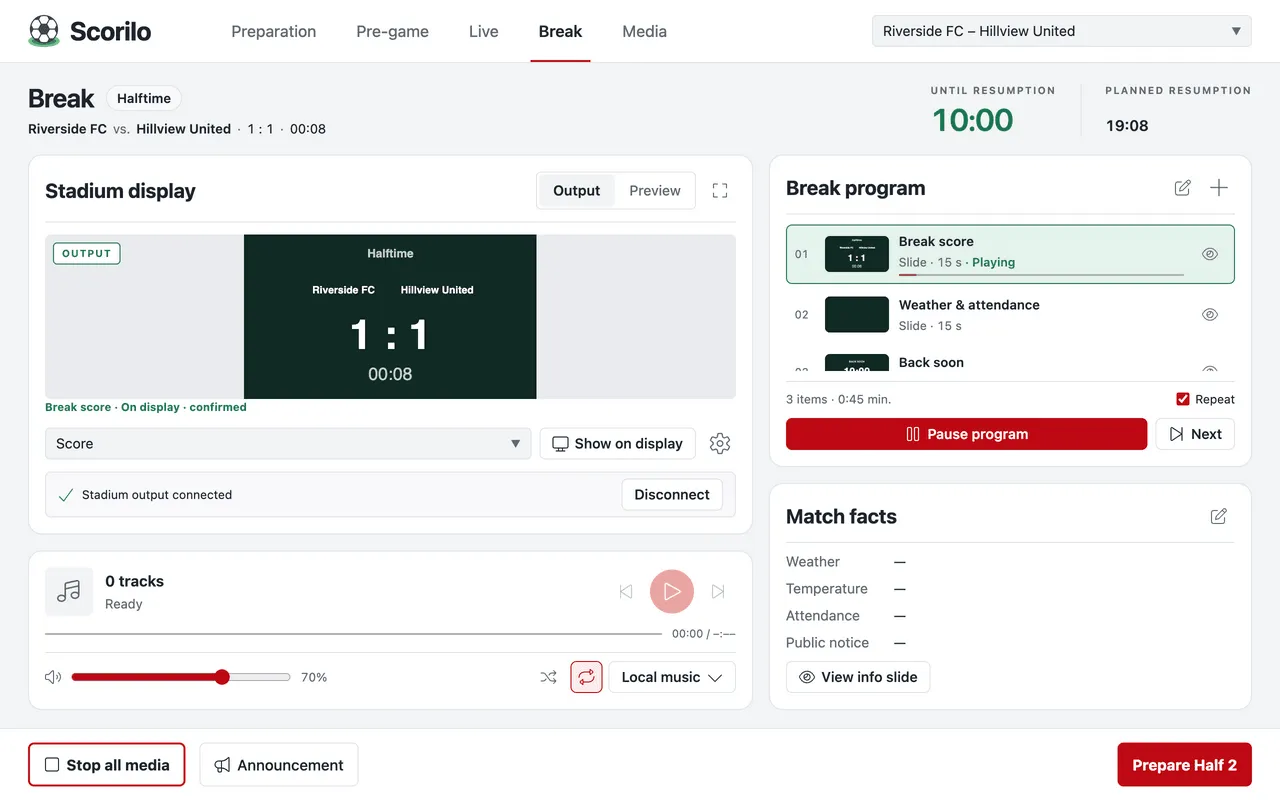
The Break view
Section titled “The Break view”- Until resumption counts down the break time you set; Planned resumption shows the time of day. At zero it reads “Resumption due”; nothing starts automatically.
- Break program contains three slides from the start: Break score, Weather & attendance and Back soon, 15 seconds each. You change it like the display program in Pre-game (Before the match). It applies to all matches of the profile.
- Match facts shows the weather, temperature, attendance and public notice for the Weather & attendance slide. The pencil edits them.
If the break program does not start on its own, for example because the display was connected later, select Start program.
Kick off the second half
Section titled “Kick off the second half”- Select Prepare Half 2 in the bottom right corner (with thirds, the button names the next period).
- Check the score and the period in the Ready to resume? dialog.
- At kickoff, select Confirm kickoff · start clock.
Result: The break program stops, the display shows the score, the clock runs and Scorilo switches to Live. When counting up, the second half starts at its scheduled match minute, for example 45:00, even if the first half had added time.
If no display is connected, tick Resume without stadium output or select Connect.
You can do the same in Live: during the break, Prepare period 2 appears below the clock. Start clock then starts the new period.
Final whistle
Section titled “Final whistle”- In the last half, select Final whistle → below the clock.
- Confirm the question.
Result: Below the clock it says “Match finished”. The clock can no longer be started; the score and the timeline stay saved. A finished match stays finished, also after a restart.
Afterwards you can copy or export the timeline (Timeline and live ticker) and select New match… for the next match.