
Squad and lineup
With a squad you can choose the scorer of a goal, record substitutions and show a lineup on the display. The scoreboard works without a squad as well; goals then appear in the timeline without names.
Add players to the squad
Section titled “Add players to the squad”If the players come from DFBnet, the squad is already filled (Import from DFBnet). Otherwise:
- Select Preparation → Squad, then Add player.
- Search for a player Scorilo already knows from an earlier match, or select Create new player.
- Choose the Team and select Add.
- In the player card on the right, under In the current match, enter the Shirt number and, if needed, mark Captain, Goalkeeper or Reserve.
- Select Apply in the bottom right corner.
Scorilo remembers players beyond the match. For the next match, you find them again with the search in Add player.
The Players in match table shows the number, name, call name, role, whether the name may appear in public and whether the player is assigned to the profile. All, Home and Away filter the table; the search finds numbers and names.
What appears in public
Section titled “What appears in public”Name in public ticker decides whether the name may appear on the display and in the copied live ticker: Approved for this match, Restricted or Unknown — keep private. A player without approval only appears with their number on lineup slides, for example “No. 7”. The birthday always stays private. Check the approvals carefully for youth teams.
Remove from match only removes the player from this match, not from the saved players.
Plan the lineup
Section titled “Plan the lineup”As soon as a team has players in the squad, Preparation → Lineup shows the lineup planner. Every change saves immediately.
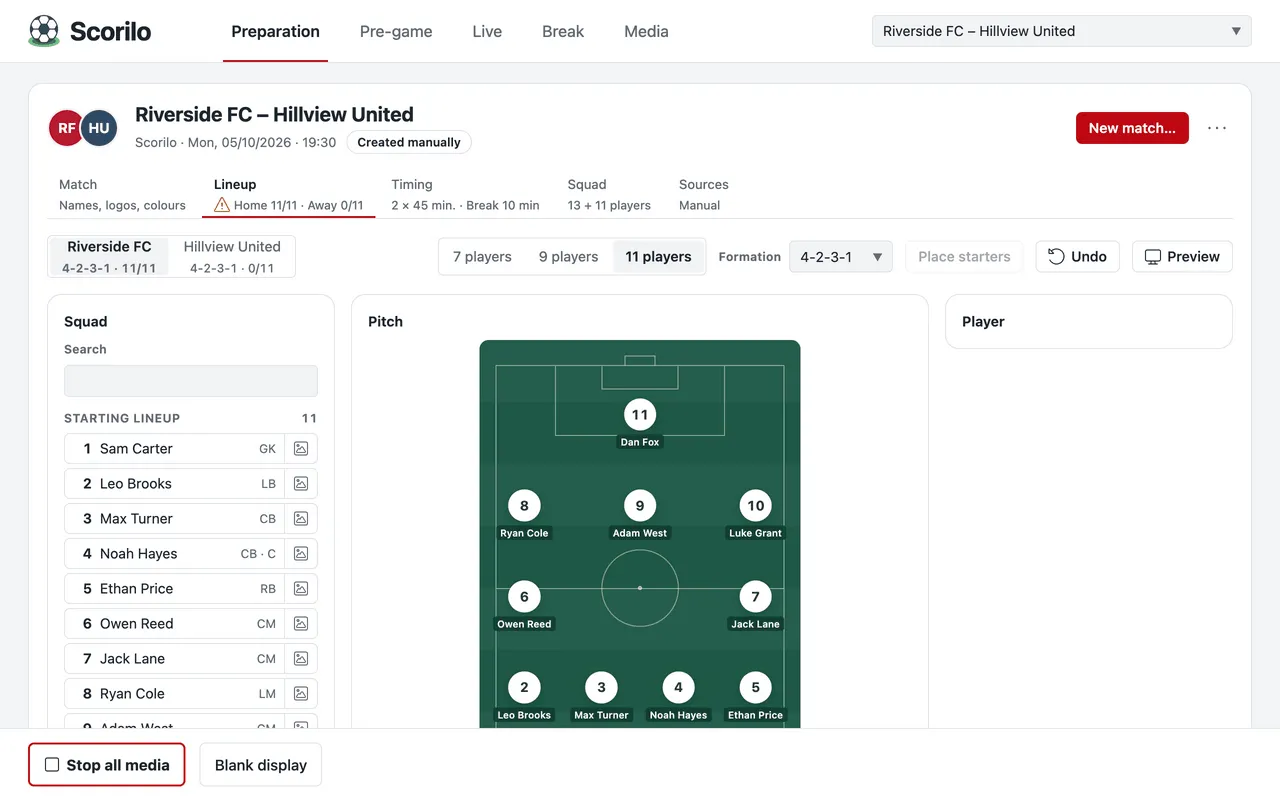
- Choose the team in the top left corner. Next to the name it shows how many positions are filled, for example “4-2-3-1 · 9/11”.
- Choose 7 players, 9 players or 11 players and the Formation. The format applies to both teams.
- Place the players: select a player in the Squad, then a position on the Pitch, or drag the player there. A player placed on an occupied position swaps with the previous one. To bench frees the position.
- Place starters fills empty positions with the starters who have none yet: the goalkeeper in goal, the others by shirt number.
- Undo reverts the last changes (up to 30 steps).
- Preview shows the lineup as it would look on the display.
From kickoff on, the lineup can no longer be changed. You record substitutions during the match in Live (Events and corrections).
Show the lineup on the display
Section titled “Show the lineup on the display”The lineup does not appear on the display by itself. Media → New offers ready-made templates, for example 7-a-side lineup – camera move and Lineup – tactics board. They always show the current plan of the current match. Then add the slide or animation to the Pre-game display program (The editor).
Player photos
Section titled “Player photos”In the player card, select Assign photo…. Scorilo takes photos from DFBnet when you import. The player intro templates use these photos.